
I built a portfolio you can visit over SSH - here’s how
You’ve probably seen developer portfolios in every form: polished React websites, minimalist one-pagers, maybe even a Notion page.
I wanted to build something different.
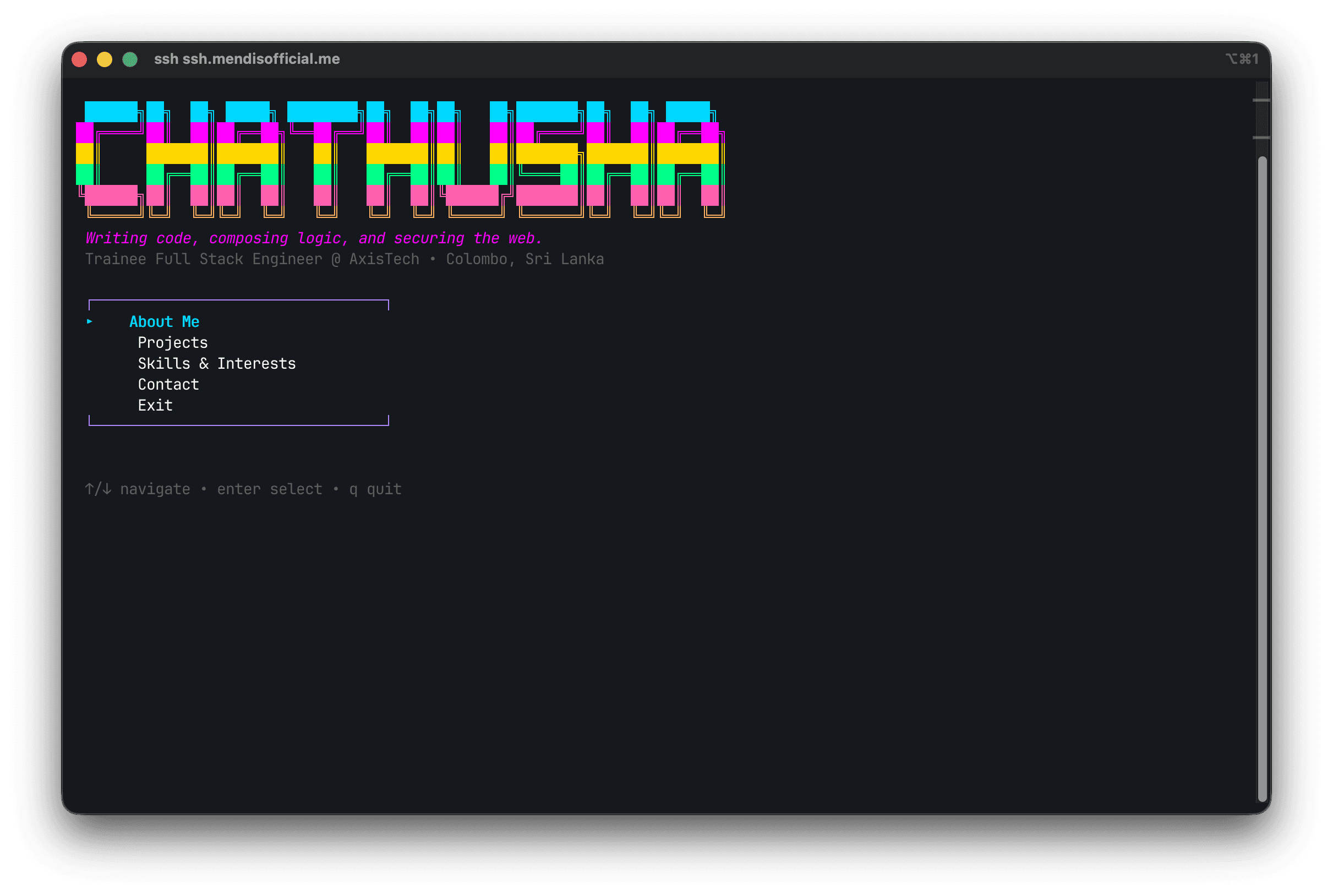
So I built a portfolio you can access directly from your terminal:
ssh ssh.mendisofficial.me
No browser. No URL bar. No login screen. Just SSH in and explore.
When someone connects, they get an interactive TUI (Terminal User Interface) with:
- my bio
- projects
- skills and interests
- contact details
with color, keyboard navigation, and scrolling.
Inspiration
This project was heavily inspired by Saai Syvendra and his SSH portfolio concept.
His original post: ssh ssh.syvendra.com – if you are a techy, you’ll love this
Seeing that made me think: I should build my own version and make it fully production-ready.
The idea
The flow is simple:
- Someone runs
ssh ssh.mendisofficial.me - Instead of a shell, they get my portfolio TUI
- They navigate using arrow keys and Enter
- They press
qto quit
No auth prompts, no passwords, no setup friction.
Tech stack
I built this in Go using the Charm ecosystem:
- Wish for SSH server infrastructure
- Bubble Tea for the terminal app architecture
- Lip Gloss for styling
My key dependencies:
require (
    github.com/charmbracelet/bubbletea v1.3.10
    github.com/charmbracelet/ssh v0.0.0-20250128164007-98fd5ae11894
    github.com/charmbracelet/wish v1.4.7
    github.com/charmbracelet/lipgloss v1.1.0
)
Architecture overview
The app is currently implemented in a single main.go file with three core pieces.
1) SSH server layer (Wish)
Wish accepts incoming SSH connections and hands each session to Bubble Tea:
func main() {
    port := os.Getenv("SSH_PORT")
    if port == "" {
        port = "22"
    }

    s, err := wish.NewServer(
        wish.WithAddress("0.0.0.0:"+port),
        wish.WithHostKeyPath(".ssh/term_info_ed25519"),
        wish.WithMiddleware(
            bm.Middleware(teaHandler),
        ),
    )
    // start server + graceful shutdown logic
}
SSH_PORT is environment-driven, so local and production behavior stay flexible.
2) TUI layer (Bubble Tea)
The model tracks:
- active page
- cursor position
- scroll offset
- terminal dimensions
- styles
The update function handles keybindings (arrows, Enter, q/Esc), and the view function renders each page.
Current sections in the portfolio:
- Main Menu
- About Me
- Projects
- Skills & Interests
- Contact
3) Styling layer (Lip Gloss)
Lip Gloss gives the TUI visual identity: color, hierarchy, spacing, and legibility.
The most important bug I hit (and how I fixed it)
Locally, everything looked perfect. Over SSH, all colors disappeared.
The reason was subtle:
- global
lipgloss.NewStyle()uses the default renderer (os.Stdout) - SSH sessions need per-session rendering because each client terminal has different capabilities
The fix was to create a renderer from the SSH session:
func teaHandler(s ssh.Session) (tea.Model, []tea.ProgramOption) {
    renderer := bm.MakeRenderer(s)
    return initialModel(renderer), []tea.ProgramOption{tea.WithAltScreen()}
}
Then I moved all styles into a per-session style bundle:
type styles struct {
    renderer    *lipgloss.Renderer
    titleStyle  lipgloss.Style
    accentStyle lipgloss.Style
}

func newStyles(r *lipgloss.Renderer) styles {
    return styles{
        renderer:    r,
        titleStyle:  r.NewStyle().Bold(true).Foreground(cyan),
        accentStyle: r.NewStyle().Foreground(green).Bold(true),
    }
}
If you’re building with Wish + Lip Gloss, this is the key takeaway: avoid global style creation when rendering over SSH.
Deployment on a VPS
I deployed this on a VPS.
Step 1: move real SSHD off port 22
Since the portfolio app needs port 22 for public access, system SSHD was moved to a high port in sshd_config:
Port 2222
Important safety rule: keep your current SSH session open, allow the new port in both the instance firewall and VPS security rules, then test from a second terminal before restarting SSHD.
Step 2: run app with systemd
I created a systemd unit to run the app continuously and restart on failure:
[Unit]
Description=SSH Portfolio TUI Application
After=network.target

[Service]
Type=simple
User=root
WorkingDirectory=/opt/ssh-portfolio
ExecStart=/opt/ssh-portfolio/ssh-portfolio
Environment=SSH_PORT=22
Restart=always
RestartSec=5

[Install]
WantedBy=multi-user.target
Step 3: DNS
A simple A record points ssh.mendisofficial.me to the VPS public IP.
CI/CD with GitHub Actions
I wanted deploys to be one-step: push to main, then auto-build and restart remotely.
name: Deploy SSH Portfolio

on:
  push:
    branches: [main]

jobs:
  deploy:
    runs-on: ubuntu-latest
    steps:
      - name: Deploy to VPS
        uses: appleboy/ssh-action@v1
        with:
          host: ${{ secrets.VPS_HOST }}
          username: ${{ secrets.VPS_USER }}
          key: ${{ secrets.VPS_SSH_KEY }}
          port: ${{ secrets.VPS_SSH_PORT }}
          script: |
            set -e
            export PATH=$PATH:/usr/local/go/bin
            sudo git config --global --add safe.directory /opt/ssh-portfolio
            cd /opt/ssh-portfolio
            sudo git fetch origin main
            sudo git reset --hard origin/main
            sudo go build -buildvcs=false -o ssh-portfolio .
            sudo systemctl restart ssh-portfolio
Secrets used
VPS_HOSTVPS_USERVPS_SSH_KEYVPS_SSH_PORT
I used a dedicated Ed25519 deploy key generated on the server and stored the private key in GitHub Actions secrets.
Pipeline issues I debugged
I ran into a few real-world failures before it became stable.
1) Dubious ownership error
fatal: detected dubious ownership in repository at '/opt/ssh-portfolio'
Cause: repo owner and deploy user were different.
Fix: safe.directory.
2) Go build VCS stamping failure
error obtaining VCS status: exit status 128
Cause: Go attempted to gather Git metadata during build.
Fix: go build -buildvcs=false.
3) Action looked successful even on failed commands
Cause: remote script continued after failures.
Fix: add set -e.
4) Permission denied on .git/FETCH_HEAD
error: cannot open .git/FETCH_HEAD: Permission denied
Cause: permission mismatch in repo files.
Fix: run Git/build commands with sudo in this setup.
Lessons learned
- SSH apps are a fantastic way to stand out as a developer.
- The per-session Lip Gloss renderer is essential for proper SSH color output.
- A VPS is all you need — the resource footprint is tiny.
- Even for personal projects, CI/CD saves time and avoids manual drift.
- SSHD port changes are risky, so always stage and test them carefully.
Try it
ssh ssh.mendisofficial.me
Use arrow keys to navigate, Enter to open sections, and q to quit.
If you’re a developer who likes building unusual things, I highly recommend trying this. The Charm toolchain makes it much easier than it looks, and shipping a portfolio in the terminal is incredibly satisfying.